AI adoption guide
The decisions a company makes when adopting AI, from judging whether it is needed and choosing the first workflow to trial acceptance and cost assessment.

What AI adoption is
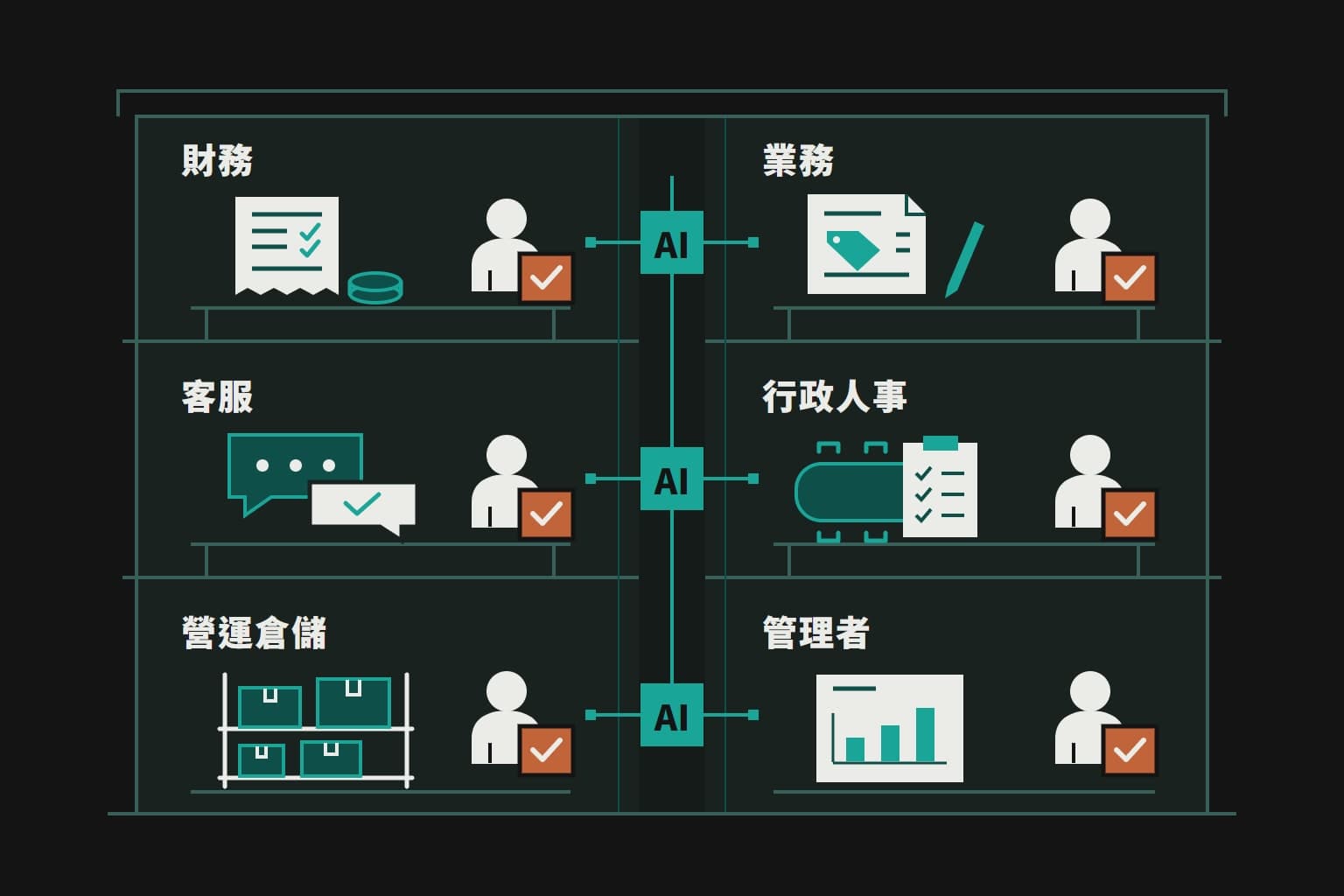
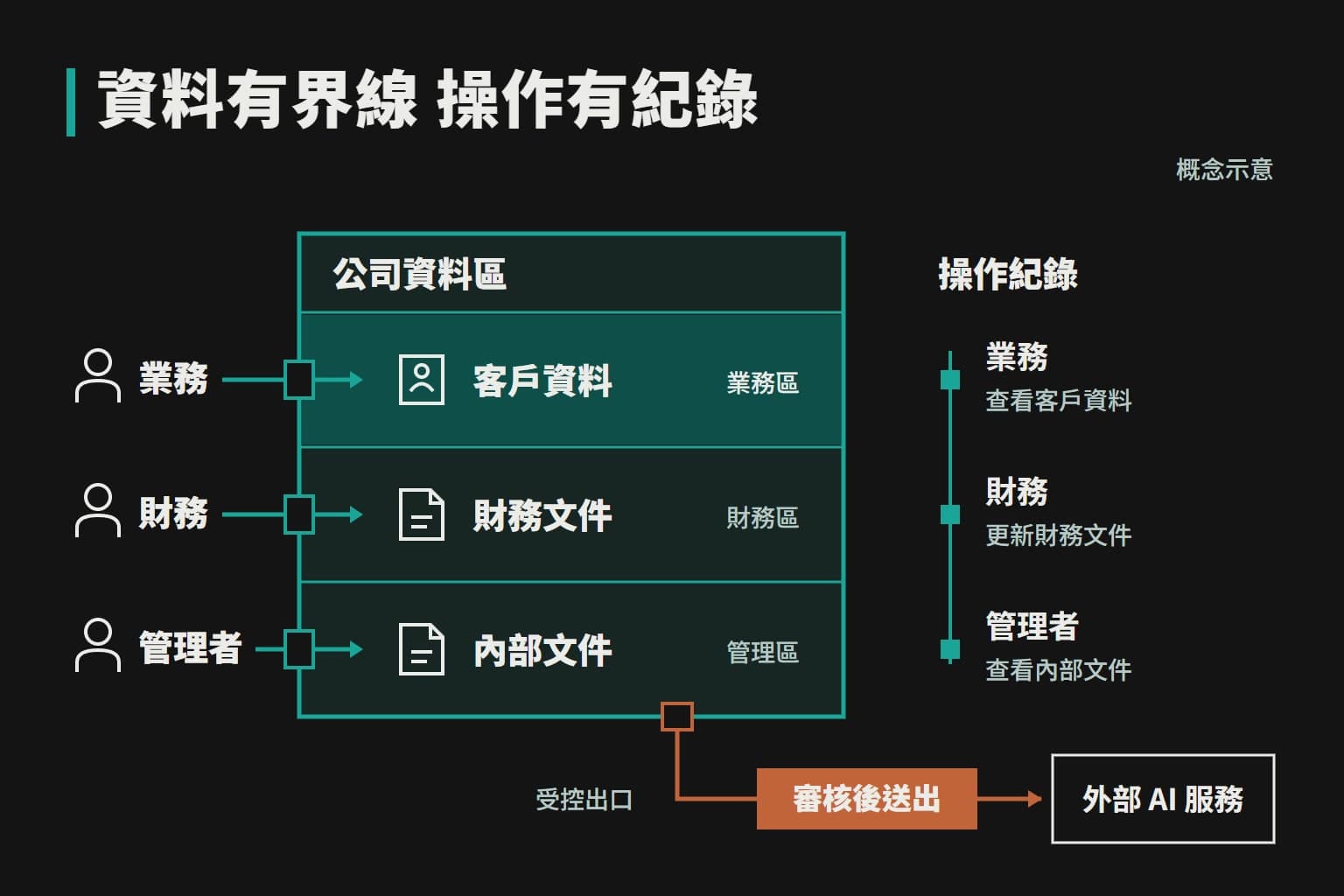
AI adoption means making AI part of your company’s daily work, rather than a tool employees use now and then. Once adopted, AI can access the data a job requires and complete assigned steps according to company rules, while the responsible employee confirms the result.
Consider an example. An employee who writes an email with a chat tool is using AI personally. Adoption looks different: when a customer makes a request, AI checks the price list and past quotes and prepares a quote, the salesperson confirms it before it is created, and the whole company works the same way. The difference lies in whether there are clear owners and rules, and whether the results can be seen.
How adoption differs from buying AI tools
| Buying a chat tool | Adoption | |
|---|---|---|
| Data | Cannot see your customers, stock or quote history. Employees copy data in and paste results back | Connected to your data and tools, with what AI can see, what it can do and who confirms decided in advance |
| Use | Results depend on individual skill | Employees do not need prompting techniques, and new hires can work the same way from the start |
| Results | Hard for the company to know how much time is really being saved | Clear owners and rules, so the results can be seen |
Buying accounts is a good first step. If your staff already use chat tools, that usually means the team is fairly receptive and has a clearer idea of which work most needs help.
How adoption differs from digital transformation
| Digital transformation | AI adoption | |
|---|---|---|
| Scope | How the entire company works, its systems and sometimes its business model | One task to start with, such as booking receipts or answering customer enquiries |
| Time | Usually years, with the cooperation of the whole organization | A single workflow can usually begin its trial within a few weeks |
A company does not need to be fully digitized before it starts. Getting one workflow right and then deciding whether to expand based on actual results is the lower-risk approach.
The four stages of adoption
BIKSEN divides adoption into four stages. Each stage answers a different question, and the next begins only once the current one is complete.
Stage 1: Understand the need
This stage establishes how a job is actually done, as opposed to how the documents say it is done. The key points are where the work starts, who touches it, which files are opened, where data is copied from and to, how many times it happens each week, how long it takes each time, and where mistakes are most likely.
The most valuable information is often the exceptions. A long-standing customer may be allowed to pay monthly, for example, yet that rule is written down nowhere. If hidden rules like this are not brought out, AI’s results will keep going wrong, so the employees who do the work must take part in the discussion.
Stage 2: Assess the value
This stage decides what to do first, based mainly on how often the work happens and how long it takes, whether the data is accessible, what a mistake would cost, and whether results can be measured. It also identifies work that does not need AI. Work with fixed rules is usually cheaper and more stable with ordinary automation, and a task that happens only once a month may not justify the investment.
Stage 3: Trial in small steps
One workflow and a small number of employees are selected to use the system in real work. The existing method is usually kept as a fallback during the trial so that daily operations are not affected. Where AI makes mistakes and where employees find it awkward to use are recorded and corrected one by one.
Stage 4: Train and adjust
After launch, unexpected situations keep arising, such as new ways customers phrase questions, changes in company policy or a change of supplier. The work of this stage is to teach employees how to use the system and review its logs, to review problems regularly, and to fill in missing data and rules. Adding the next workflow is discussed only once things are confirmed to be stable.
Timeline and staff involvement
- About an hourFirst discussion
- One to two weeksMapping the workflow
- Usually a few weeksBuilding and trialling a single workflow
- After thatOngoing adjustment
This is a general guide, and the exact timeline can be confirmed only after the mapping. What affects it most is usually not software development but whether the data is orderly, whether existing systems can be integrated, and whether the company can set aside time to confirm the rules.
Your company needs to provide two roles:
- An employee who actually does this work
- explains the current method and gives feedback on the trial
- A manager who can make decisions
- says how special cases should be treated
The owner does not need to be involved every day, but should take part personally at two points: when setting priorities, and when deciding whether to continue after the trial.
How to choose the first workflow
The more of these conditions a job meets, the better it suits an early start:
Good to start with
- It happens several times a week and is a real problem
- The method is largely fixed and the steps can be described
- The data it needs is already stored somewhere, even if only in Excel
- Mistakes can be noticed and corrected
- Some employees are willing to try it and can make time to give feedback
Should not come first
- Mistakes are costly and hard to notice, such as making payments directly or committing to prices
- Every case is different, and even senior employees cannot explain the basis for their judgement
- It happens only a few times a year, so the investment is hard to recover
- The data is entirely unorganized, or involves large amounts of sensitive personal data with permissions not yet clarified
- The company has not yet agreed internally on how the work should be done
Common starting points include answering customers’ repeated questions, booking receipts, drafting quotes from past data, organizing meeting notes, and listing the invoices to issue and the payments to chase at month end.
Work that should not come first is not ruled out forever; it simply does not suit a first step. Building results with simpler workflows and giving employees confidence makes what follows much smoother.
When the owner and staff have different priorities
Owners usually want reports and decision information, while employees want less repetitive daily work. The first workflow can lean toward what troubles employees most, because people keep using what makes a noticeable difference, and the data built up along the way becomes the basis for later reports. If the owner’s concern is clearly causing greater losses, such as miscalculated quotes or receivables that cannot be collected, it should take priority.
How to tell whether it is working
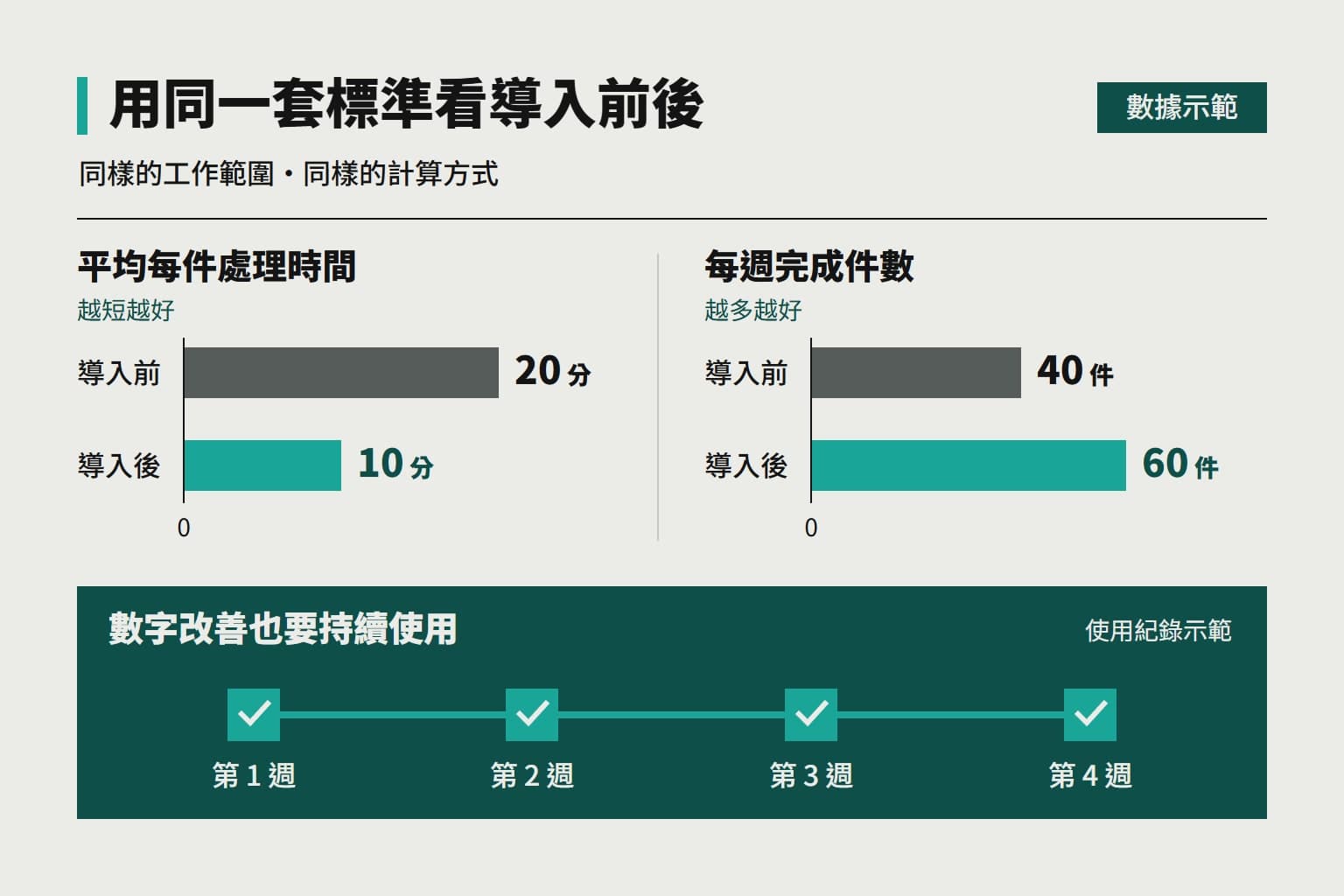
Record the current situation before you start, or there will be nothing to compare against later. Choose two or three measures, such as the time per case, the number of cases handled each week, the number of errors or returns, and how long customers wait for a reply, and compare the results before and after the trial in the same way.
Another easily overlooked measure is whether employees keep using it. If everyone has gone back to the old method after a few weeks, it cannot be called a success, even if the numbers look good.
We also recommend setting the trial period, expected goals and stopping conditions before the trial begins. When these are clear in advance, the trial does not end with nothing more than a conclusion that it “felt useful” or “felt useless”.
How to estimate whether it is worth it
A simple estimate is a good place to start. The following figures are for illustration only. Suppose you issue 10 quotes a week, with AI drafting each one and an employee confirming it.
- Originally
- 30 min
- AI drafts, employee confirms
- 10 min
- 20 min
- Saved per quote
- 3.3 hrs
- Saved per week, approx.
- 14 hrs
- Saved per month, approx.
Two points need attention in this assessment. First, hours saved are not the same as money saved. Unless that time goes toward taking on more business, reducing overtime or adjusting staffing, it will not show up directly in cash. Second, costs should include the build fee, monthly usage fees and the time employees spend confirming.
Some benefits are hard to convert into figures, such as replying to customers outside office hours, no longer miscalculating quotes, and work continuing when an employee is on leave. The actual benefit must be assessed with each company’s own numbers, and we calculate it as part of the mapping.
Common reasons for failure and how to address them
When adoption underperforms, the cause is usually not that AI is not clever enough, but one of the following:
- Vague goals
- the aim is only to “improve efficiency”, so in the end nobody can tell whether things improved
- Too broad a scope
- several departments go live at once, and when problems arise the cause is hard to find
- Buying the tool before finding a use
- the tool does not connect with the actual work
- No owner
- when mistakes occur, nobody corrects them
- A gap between demo and reality
- errors keep occurring once the company’s own data is used
- No maintenance after launch
- policies have changed but AI still gives old information, and employees gradually lose trust
When a trial falls short of expectations
- Content is often wrong: this is usually caused by incomplete data or unclear rules, so complete the data first
- Content is correct but employees are reluctant to use it: it may have added steps or may not be integrated into the tools they normally use, so change how it is used
- Errors occur only in special cases: have people deal with those cases and let AI handle only the simple part
- Still unstable after repeated adjustment: the work may not suit AI, or ordinary automation may be a better choice
Once the cause is found, you can narrow the scope and trial it again, or you can decide to stop. Establishing that a job does not suit AI is also a valuable conclusion.
Staff concerns and data preparation

Staff who worry about being replaced
This is a normal reaction. Employees who believe adoption is meant to replace them are unlikely to explain how the work is really done or to commit to the trial. A more effective approach is to start with the work employees themselves least want to do, include the people who do the work in the discussion, leave the final confirmation with employees, and have managers explain how the time saved will be used.
Also, if the new way is more troublesome than the old one, no amount of promotion is likely to help. When employees are reluctant to use it, first check whether the tool itself is easy to use.
Messy data or no SOPs
A company does not need to organize all of its data before starting, only the part the first workflow needs. To work on quotes, for example, start by organizing items and prices. Many companies have no written SOPs either. The actual methods can be documented through interviews, and this process itself often reveals that employees are not in fact working the same way.
What makes up the cost and how to compare quotes
Because every company’s workflows and needs differ, adoption has no fixed price. The cost usually includes the following items:
- Build
- understanding the workflow, design, development and connecting existing tools, usually a one-time fee
- Data preparation
- organizing catalogues, price lists and old data into a form AI can use
- Usage fees
- cloud models are billed by usage and some tools have monthly fees; on your own equipment the cost is mainly the equipment
- Training
- teaching employees how to operate it
- Maintenance and adjustment
- changes when policies change or new situations arise
When comparing quotes, we recommend adding up the total cost over one to two years rather than looking only at the first amount. Quotes vary widely, often because of differences in scope: some providers only help set up an off-the-shelf tool, while others go deep into the workflow, connect internal systems and provide ongoing maintenance.
What to confirm when comparing
- What work is in scope and which systems will be connected
- Who is responsible for preparing the data
- What the acceptance criteria are
- Whether maintenance after launch is included
- Who pays the AI usage fees
- How data and code are transferred when the engagement ends
Choosing who does the work
| Suits | Keep in mind | |
|---|---|---|
| Trying it yourself | Simple work and employees who are interested, such as drafting copy or organizing meeting notes | The cost is low, but it depends on individual ability and is hard to connect to company systems |
| Hiring an engineer | Companies with long-term development needs that can support a permanent position | There is a resignation risk when there is only one person. Assess whether that person understands your business workflows |
| Engaging an outside company | Companies that want to see results soon and have no dedicated technical staff | Confirm maintenance and transfer arrangements in advance to reduce the risk of dependence |
When choosing a partner, see whether they first try to understand the work, whether they are willing to say what does not suit AI, whether they can show a system that actually runs, and whether they can explain acceptance and how errors are dealt with. If a provider guarantees a fixed amount of savings or claims that AI does not make mistakes, we suggest asking further about the basis for that claim.
When adoption can wait
Adoption can wait if your company is small and the workload is light, so that manual handling takes little time; if the way you work is undergoing major change; or if nobody can currently make time to take part in a trial. During this period, employees can try chat tools to learn what AI can do.
On the other hand, if the same task causes trouble every week, or you often lose customers or money through slow replies, miscalculations or omissions, it is worth starting an assessment.
Further reading

This article is general information, not legal, tax or financial advice. Actual timelines, costs and results depend on each company and on written agreement.